Table of Contents
Reposilite supports S3-compatible storages as a backend for Maven repository.
Known S3-compatible storages used by our community:
| Name | Description | Compatibility |
|---|---|---|
| Amazon Simple Storage Service | ✔️ | |
| Managed object storage without egress fees | ✔️ | |
| Self-hosted object storage | ✔️ | |
| Used by cloud providers like Contabo | ✔️* |
* - There were some issues with Ceph in the past, but it looks good enough lately
Each repository has individual storage provider configuration,
so some of them can use object storage and others can use local filesystem.
By default, each S3 repository uses its own dedicated bucket and stores objects at the bucket root.
You can also share a single bucket across multiple repositories (or with other services) — see
.
S3 configuration can be defined in the
Dashboard -> Settings -> Maven -> <Repository> section: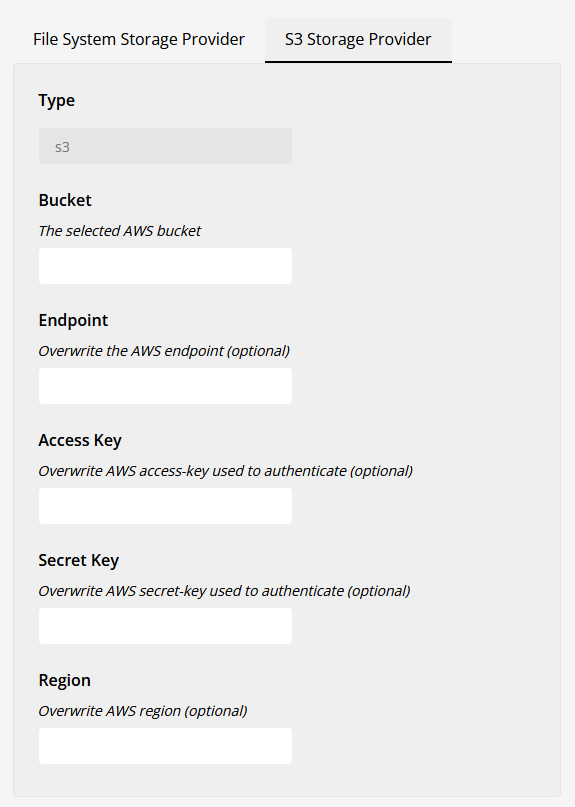
These values depend on your S3 provider & its configuration,
so you have to check their documentation to find out how to configure them.
By default, Reposilite writes objects to the root of the bucket, which is why each S3 repository
needs its own dedicated bucket. Two optional settings let multiple repositories — or other services —
share a single bucket:
- Key Prefix (
prefix) — an optional prefix prepended to every object key. Use it to scope Reposilite's data within a bucket shared with other tools, e.g. set it toreposiliteso all objects live underreposilite/…next to another service'sregistry/…. - Shared Bucket (
sharedBucket) — enable when several Reposilite repositories share one bucket. Object keys are then namespaced under the repository name, so repositories never collide with or see each other's files.
The resulting object key for an artifact
com/example/lib.jar is:| Key Prefix | Shared Bucket | Object key |
|---|---|---|
| (empty) | off | com/example/lib.jar (default) |
reposilite | off | reposilite/com/example/lib.jar |
| (empty) | on | <repository>/com/example/lib.jar |
reposilite | on | reposilite/<repository>/com/example/lib.jar |
For example, two repositories sharing one bucket with
prefix: reposilite and sharedBucket: true:s3://my-bucket/
└── reposilite/
├── releases/
│ └── com/example/lib.jar
└── snapshots/
└── com/example/lib-1.0.0-SNAPSHOT.jar
Note - repositories sharing a bucket must not overlap. Either enable Shared Bucket on all of them
(keys are namespaced per repository), or give each a distinct prefix. If two repositories would write to the
same — or a nested — key namespace, Reposilite refuses to load the colliding ones and logs an error on startup.Note - this check matches repositories by their configured endpoint and bucket name. If the same
bucket is reached through different endpoint spellings (for example an empty endpoint that resolves to AWS
versus an explicit AWS URL), Reposilite cannot tell they are the same bucket — keep the endpoint
consistent across repositories that share one.The default (empty prefix, Shared Bucket off) is unchanged, so existing single-bucket-per-repository
setups keep working without any migration.
provides a managed, strongly consistent object
store, an included free tier, and .
Create a bucket and an API token in Cloudflare, then configure the repository with the S3 endpoint
shown in the R2 dashboard (
https://<ACCOUNT_ID>.r2.cloudflarestorage.com), the generated access key
and secret, and region auto.Set Signer to
LEGACY_V4 in the repository's S3 storage settings. The existing JVM flag
(JAVA_OPTS environment variable for Docker users) remains available as a global override for all
S3 repositories:-Dreposilite.s3.use-s3-v4-signer=true
R2 credentials can be restricted to an existing bucket. If the token cannot create buckets, disable
Reposilite's automatic bucket creation globally:
-Dreposilite.s3.skip-bucket-creation=true
MinIO supports path-style access by default. Virtual-hosted access requires
MINIO_DOMAIN and
matching wildcard DNS; for a typical MinIO endpoint, enable path-style access with this global JVM
flag (JAVA_OPTS environment variable for Docker users):-Dreposilite.s3.pathStyleAccessEnabled=true
Example properties:
bucket: your-bucket
endpoint: http://minio:9000 # your minio endpoint
access-key: your-access-key
secret-key: your-secret-key
region: doesn't matter, e.g. us-east-1
Ceph is not fully compatible with S3 API. Known issues:
- Object listing is not supported - Reposilite won't be able to e.g. list all versions of the artifact or display directory content in the UI
Did you find misleading or deprecated content? Maybe you just feel this section misses important elements?
Copyright © 2020-2026 dzikoysk